

If you’re building an online course on LearnDash, choosing the right platform for video hosting is one of the most important decisions you’ll make. The platform you pick affects your site speed, student experience, and how much control you have over your content.
This guide covers LearnDash video hosting from start to finish: how to compare your options, how to embed video in LearnDash lessons, and how to set up VdoCipher as your hosting platform – in four steps, no coding required.
Quick Answer: The best video hosting for LearnDash depends on your course type. YouTube and Vimeo are free and easy to embed, but offer no piracy protection. VdoCipher is the recommended option for paid courses – it gives you DRM protection, a custom player, and per-student watch time analytics. To embed video in LearnDash, upload to your chosen platform, copy the shortcode, and paste it into your lesson editor. No coding required.
Table of Contents:
- LearnDash Video Hosting Options
- How to Embed Video in LearnDash: Your 3 Main Options
- Step-by-Step: How to Embed Secure Videos in LearnDash with VdoCipher
- LearnDash Tutorial Video: Embed Secure Videos
- Feature Comparison: YouTube vs Vimeo vs VdoCipher for LearnDash
- Best Practices for LearnDash Video Hosting & Protection
- Key Takeaways
- FAQs: LearnDash Video Embedding
LearnDash Video Hosting Options
LearnDash does not host your videos. It is a course management plugin – it handles enrolments, quizzes, progress tracking, and lesson access. For video hosting you need a separate platform. Here is what you need to know before choosing one.
Why you should not self-host videos on WordPress
Uploading videos directly to your WordPress Media Library is the most common mistake new LearnDash course creators make. Video files are large (often 500MB to several GB per lesson), and standard web hosting is not built to stream video. The result: slow load times, high bandwidth costs, and videos that can be downloaded directly from your server by anyone who inspects the page source. For anything beyond a single free lesson, use an external video hosting platform.
How YouTube, Vimeo, and VdoCipher compare for LearnDash
| Feature | VdoCipher | Vimeo | YouTube |
|---|---|---|---|
| Video Progression | 🔜 Coming soon | ✅ Yes | ✅ Yes |
| Piracy Protection | ✅ DRM | ⚠️ Basic | ❌ No |
| Custom Player | ✅ Yes | ✅ Yes | ❌ No |
| Dynamic Watermark | ✅ Yes | ❌ No | ❌ No |
| Ads to Students | ✅ No | ✅ No | ⚠️ Yes |
| Free Plan / Trial | ✅ Trial | ✅ Basic | ✅ Free |
How to Embed Video in LearnDash: Your 3 Main Options
Here’s a quick breakdown of the 3 common platforms used to host videos for LearnDash courses:
YouTube
- ✅ Free and popular
- ✅ Easy to embed
- ❌ No content protection
- ❌ Shows ads, related videos, and branding
- ❌ Students can download or share the video link
Vimeo
- ✅ Cleaner and more private than YouTube
- ✅ Some privacy options (like domain restriction)
- ❌ Still vulnerable to video downloads via browser extensions
- ❌ DRM protection only available on costly plans
VdoCipher (Recommended)
- ✅ Encrypted DRM streaming (same as Netflix & Hotstar)
- ✅ Blocks download, screen capture (in mobile apps), and sharing
- ✅ Dynamic watermark with user email, IP & timestamp
- ✅ Fully customizable video player
- ✅ Integrates via shortcode or plugin – no coding needed
If you’re offering paid content, VdoCipher gives you the best video player for LearnDash with security built in.
Step-by-Step: How to Embed Secure Videos in LearnDash with VdoCipher
Here’s the accurate method to embed videos in LearnDash using VdoCipher’s official WordPress plugin.
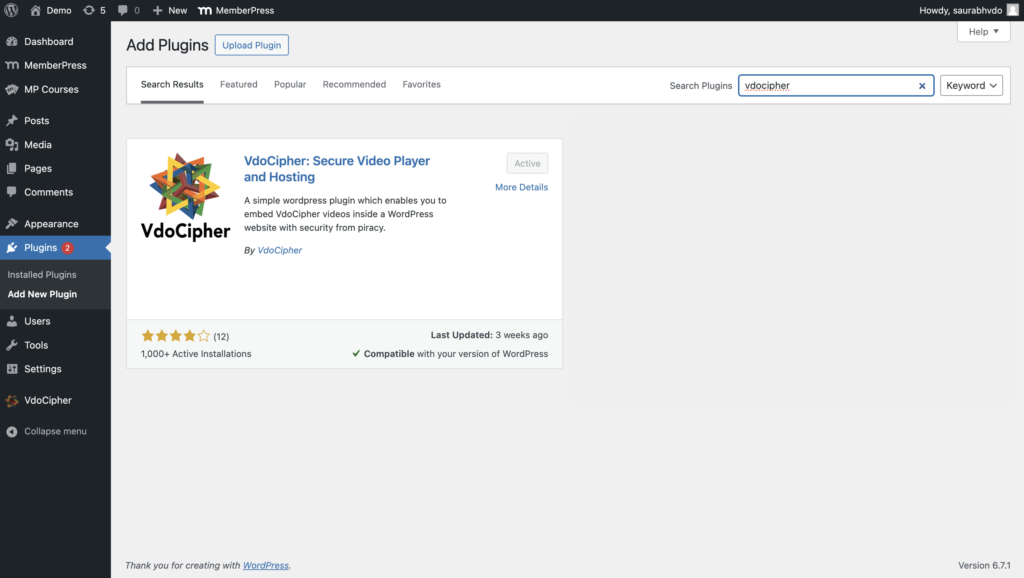
Step 1: Install the VdoCipher WordPress Plugin
- Go to your WordPress dashboard → Plugins → Add
- Search for “VdoCipher” and click Install, then Activate
- Visit the plugin settings and paste your API Key (available in your VdoCipher dashboard under Config)
Step 2: Upload Your Videos to VdoCipher
- Log in/Sign up into your VdoCipher dashboard
- Click Upload Video
- The platform automatically encrypts your video with DRM protection
- You can customize settings like watermark, expiry, theme, and speed control

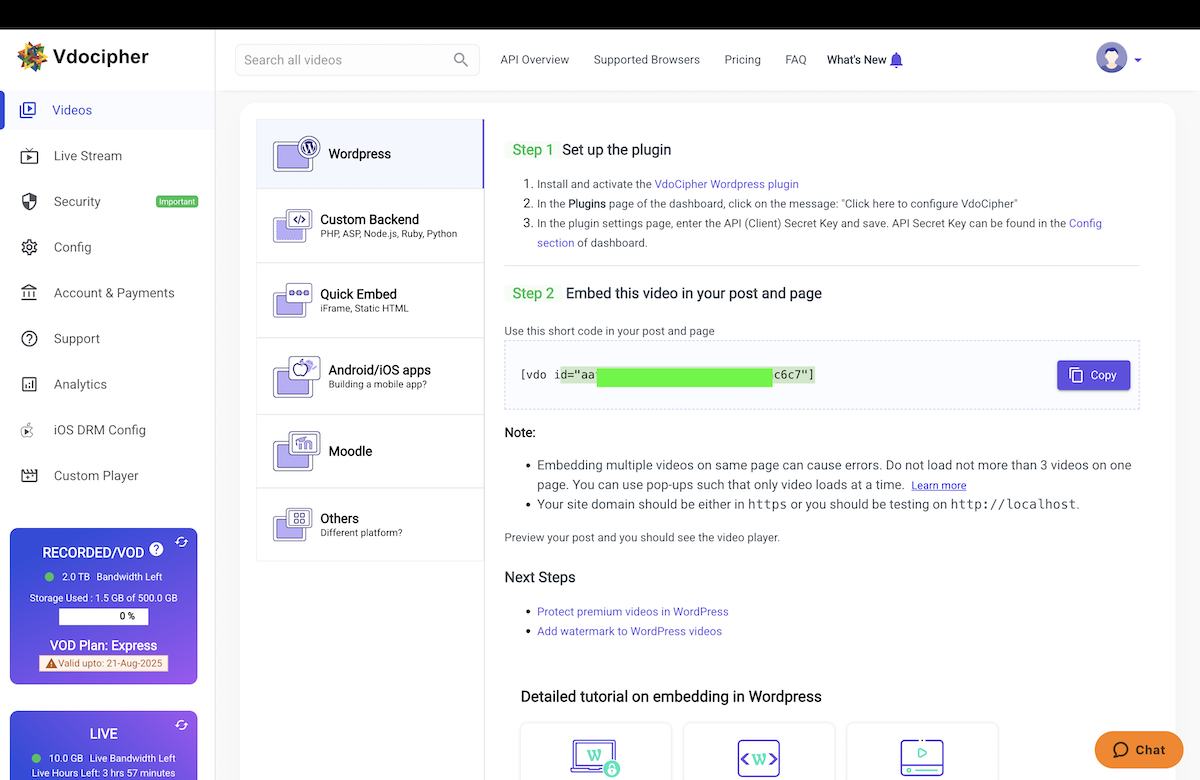
Step 3: Copy the Shortcode or Embed Code
- Once uploaded, click on your video
- Click the Embed button → WordPress → Copy shortcode (e.g.
[vdo id="aa....."]
)
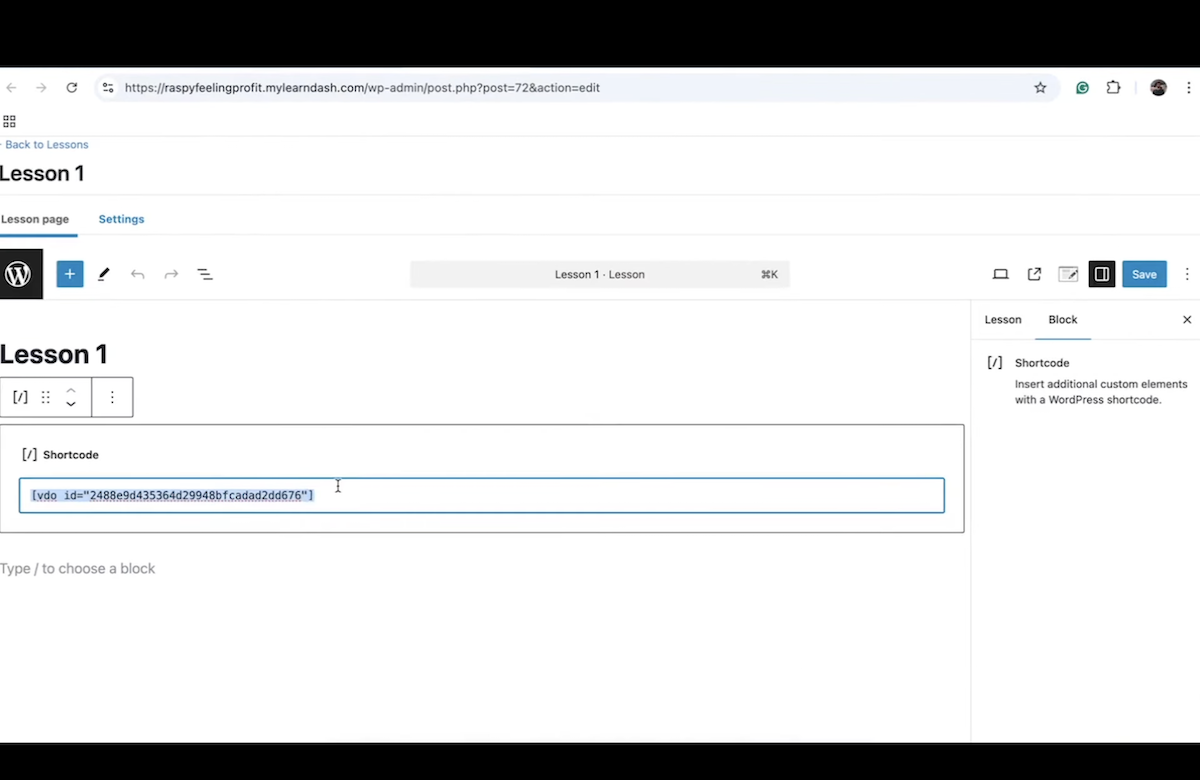
Step 4: Embed Video in LearnDash
- In WordPress, go to LearnDash LMS → Lessons (or Topics)
- Click Edit on the lesson where you want the video
- In the content editor, add a Shortcode block or switch to Text/HTML view
- Paste the VdoCipher shortcode or embed code
- Click Update/Publish
That’s it! Your video will now stream securely in your LearnDash lesson with encryption and watermark protection.
LearnDash Tutorial Video: Embed Secure Videos
Prefer to follow along visually? Watch this YouTube tutorial to see how to embed secure videos in LearnDash using VdoCipher. The video covers installing the VdoCipher plugin, uploading and securing your videos, embedding them into LearnDash lessons, and customizing your player and watermark – all in just a few minutes.
Ready to Try It Out? ✅
Find out how over 3000+ customers in over 120+ countries use Vdocipher’s online video player to ensure seamless and secure video streaming!
Best Practices for LearnDash Video Hosting & Protection
Here are some tips to ensure your video content is both engaging and secure:
Use DRM Encryption – Choose a platform like VdoCipher with Hollywood-grade DRM encryption to block downloads and screen capture.
Avoid Hosting Large Videos on WordPress – Uploading videos directly to your WP Media Library will slow down your site and make them easier to steal.
Add Dynamic Watermarking – VdoCipher lets you show the user’s email, IP address, and timestamp as a visible watermark — discouraging screen recording.
Optimize for Mobile & Bandwidth – VdoCipher supports adaptive streaming, so videos adjust quality based on your learner’s internet speed.
Use LearnDash Video Progression – You can use LearnDash’s video progression feature with VdoCipher embeds to force students to watch videos before moving on.
Key Takeaways
- LearnDash does not include video hosting – you need an external platform. Self-hosting on WordPress is not recommended for course videos.
- For paid courses requiring piracy protection and student watch time analytics, VdoCipher is the most complete LearnDash video hosting option.
- VdoCipher does not support LearnDash’s native Video Progression feature. Use LearnDash’s Forced Lesson Timer as a workaround set the minimum time to match your video length.
- Embedding VdoCipher in LearnDash takes four steps: install the plugin → upload your video → copy the shortcode → paste into your lesson editor. No coding required.
Read More? ✅
This article gives you a clear, bias-free LearnDash VS LifterLMS comparison, so you can match each plugin’s approach to your needs.
FAQs: LearnDash Video Embedding
Made for LearnDash. Designed for Security.
VdoCipher offers powerful video protection with seamless LearnDash integration. From DRM encryption to branded player customization and smooth mobile playback - we make sure your course content stays secure and looks professional.


Leading Growth at VdoCipher. I love building connections that help businesses grow and protect their revenue. Outside of work, I’m always exploring new technology and startups.
 Assaf Manor says
August 16, 2025 at 8:54 amI’m using vdocipher on my LearnDash website for many years already. But an honest review and comparison between products would indicate one major flaw of vdocipher with regards to Vimeo and YouTube – you can’t embed the video using LearnDash’s native video embedding feature which also integrates with LearnDash’s “Course Progression” feature.
Now, knowing this – I still prefer vdocipher, but this should be known. And so I would suggest that you add this to your article and also another row to the comparison table, now with one ❌ on the vdocipher column. This will only make you look more transparent and honest.
 Saurabh Shah says
March 3, 2026 at 10:58 amThanks a lot for pointing this out and for being a long-time user, really appreciate it.
You’re absolutely right that native LearnDash video embedding tied directly to the Course Progression feature is something many creators value.
The good news is that Course Progression integration is currently in development in collaboration with the LearnDash team. It’s something we’re actively working on and it will be released soon.
We agree that transparency matters, and we’ll update the article to reflect the current state clearly.
Thanks again for the thoughtful feedback.