
Fairplay DRM is the trusted studio-approved DRM for secure playback in the Apple IOS app, IOS Safari, Mac Safari. In this post, we present a complete guide for implementing Apple FairPlay DRM. FairPlay DRM protects videos from download and also stops screen capture of videos. The first half of the article explains the technology behind Fairplay DRM and second half will talk about implementation.
For implementation, the content owner/distributor has to obtain the required license from Apple to use this. If using VdoCipher, you don’t need to handle either the media packaging or the KSM. You only need to obtain the FairPlay certificate and the rest is handled by us.
TABLE OF CONTENT
- What is FairPlay DRM?
- Apple Fairplay DRM Compatibility
- Features of Apple FairPlay DRM
- Supported Ecosystem of Apple FairPlay Streaming
- Supported Formats for Apple FairPlay
- How FairPlay DRM Streaming Works?
- FairPlay DRM Streaming Terminologies
- Explainer Video
- How to get Fairplay Streaming Server SDK
- How To Request Apple FairPlay DRM Production License?
- How To Use the FairPlay DRM Deployment Package
- FAQs on Apple FairPlay DRM Streaming
What is FairPlay DRM?
Fairplay is Apple’s DRM technology, which is used by Apple exclusively to stream content securely on iOS app, iOS safari, macOS safari as well as TV OS.
Fairplay streaming(FPS) securely delivers encrypted content using HTTP Live Streaming(HLS) protocol, m3u8 playlist, segment format like TS & fMP4/CMAF and its device based FairPlay Module.
Apple Fairplay DRM prevents video download as well as ensures screen recording protection.
Apple Fairplay DRM Compatibility
Fairplay DRM is compatible with the following devices & browsers:
- Mac Safari
- iOS Safari (iOS >11.2)
- iOS App. Native Apps are supported, web view apps are not supported.
- WatchOS 7+
Features of Apple FairPlay DRM
Here’s an overview of the fundamental features of Apple FairPlay DRM and how they enhance content security:
Hardware/Kernel backed Decryption
Apple devices with iOS, and tvOS come equipped with hardware/kernel-level security, making them highly secure environments for deploying FairPlay DRM (FPS). This hardware integration is crucial for securing premium content, as it provides a higher security level that is not readily available when using solutions like Widevine CDM SDK for iOS or Chrome’s Widevine on macOS.
- On iOS devices and Apple TV, “the key handling and the content decryption occur on the kernel of the iOS device”and “the content as well as the content key are kept on the device kernel for the decryption.” – Apple Developer PDF
- For Safari on macOS, Apple says “Safari on OS X enables FPS using EME interface support.” That means Safari uses the browser’s Encrypted Media Extensions path rather than the iOS-style kernel wording Apple uses for iPhone/iPad/Apple TV. – Apple Developer PDF
Apple AirPlay Compatibility
One of the standout features of FPS DRM is its native support for Apple AirPlay, the technology that enables wireless streaming of content from Apple devices to Apple TV. This seamless compatibility allows FPS content to be easily played through AirPlay without requiring additional programming. Moreover, when FPS content is streamed to an Apple TV via AirPlay, the key delivery and decryption processes occur directly on the Apple TV. This maintains the same high security level as if the content were being played directly from the source device, such as an iPhone.
Download and Offline Playback
Starting from iOS 10, Apple has enhanced the FPS capabilities to include support for downloading and offline playback. This feature is particularly beneficial for users who wish to access content without an internet connection. The relevant APIs provided by Apple’s operating system facilitate the handling of downloading HLS content along with managing offline licenses. This ensures that even when content is accessed offline, it remains protected under the stringent security measures enforced by FPS DRM.
Supported Ecosystem of Apple FairPlay Streaming
To effectively deploy Apple FairPlay Streaming (FPS), it is essential to understand the supported platforms and versions that can leverage this DRM technology. Here is a detailed table outlining the compatibility across different Apple devices and operating systems:
| Platform | Supported Version and Requirements |
| PC | macOS 10.10 or later: Safari browser |
| Mobile | iOS 9.0 or later: iOS native app |
| iOS 11.2 or later: iOS Safari browser | |
| iPadOS 13.1 or later | |
| Watch | watchOS 7 or later |
| Apple TV | tvOS 10.0 or later |
Supported Formats for Apple FairPlay
Apple FairPlay supports a variety of streaming formats and protocols to ensure broad compatibility and high-quality streaming experiences. Below is a table that summarizes the supported formats and protocols under the FairPlay DRM:
| Type | Supported Formats/Protocols |
| Streaming | HLS, CMAF |
| Video | TS, fMP4 container |
| Video Codec | AVC (H.264), HEVC (H.265) |
| Audio Codec | AAC, MP3 |
How FairPlay DRM Streaming Works?
Now we have understood the compatibility, supported devices and browsers, ingestion formats and what special features are provided by FairPlay DRM, let’s dive into its working.
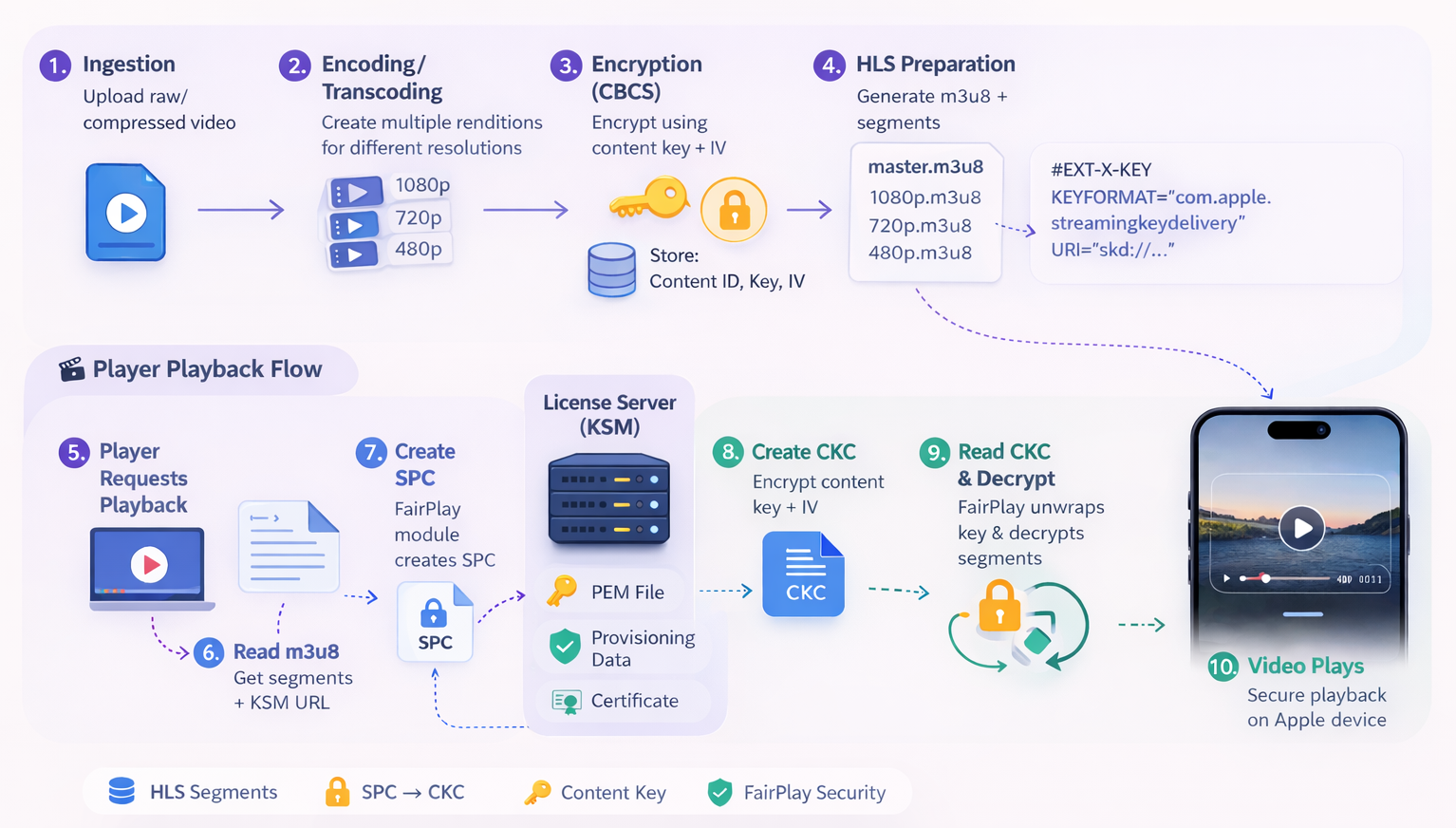
Step 1: Ingestion
Raw/Uncompressed/Compressed video is ingested via upload
Step 2: Encoding/Transcoding
It is performed on the video file to convert it into a compressed format container and also make multiple files for different resolutions.
Step 3: Encryption
The encoded renditions are encrypted with an SAMPLE-AES/CBCS-compatible packaging content key. The content provider stores the content ID, content key, and IV in its Packaging/Encryption Backend/KSM-side systems.
Step 4: HLS Preparation
As Apple says, “The content needs to be authored for delivery using HLS”. For the same, a m3u8 playlist and segment files need to be prepared and stored. Since there are multiple resolution files, the playlist will contain the information about all of them. A master m3u8 playlist file can contain information about different resolutions m3u8 files and then separate playlist files will have information about the segments.
Example: master.m3u8
#EXTM3U
#EXT-X-STREAM-INF:BANDWIDTH=5000000
1080p.m3u8
#EXT-X-STREAM-INF:BANDWIDTH=2500000
720p.m3u8
#EXT-X-STREAM-INF:BANDWIDTH=1200000
480p.m3u8
Example: 1080.m3u8
#EXTM3U
#EXT-X-VERSION:6
#EXT-X-TARGETDURATION:6
#EXT-X-MEDIA-SEQUENCE:0
#EXT-X-PLAYLIST-TYPE:VOD
#EXTINF:6.0,
segment1.ts
#EXTINF:6.0,
segment2.ts
#EXTINF:6.0,
segment3.ts
#EXT-X-ENDLIST
M3u8 files also contain the content-key information like,
#EXT-X-KEY:METHOD=AES-128,URI="key.key"
#EXTINF:6,
segment1.ts
#EXTINF:6,
segment2.ts
In non-DRM HLS AES-128, the playlist may point to a key retrieval URI. In FairPlay DRM, the playlist instead carries FairPlay key-delivery signaling so the device can request a license/CKC from the KSM rather than fetch a plain reusable content key. So when going with DRM, this key is instead a url of license server (KSM). The playlist contains an EXT-X-KEY tag with FairPlay signaling, typically using KEYFORMAT=”com.apple.streamingkeydelivery” and a skd:// URI or equivalent key-delivery reference, not a plain downloadable AES key file.
Step 5: Player Request for Playback
Till step 4, the encryption and video preparation gets completed. Now, the process starts from the player’s end. A DRM player associated with the video infrastructure handler (step 1-4) will carry the next parts.
Now the player receives a request to play the encrypted video.
Step 6: Process m3u8
The player will first go to the m3u8 file to check what files are there. Since the video segments will first need a decryption and for that they will require the content-key to decrypt. It will find video file segments and License server url for the key.
Step 7: Create SPC (Server Playback Context) Package
This is where the FairPlay Module comes into play. The player/application will now request the FairPlay module which can be present in the Apple device kernel or CDM to make the SPC. The application obtains or uses the FairPlay application certificate / public-key-related material and content identifier, then asks the OS/FairPlay stack to generate the SPC. If verification is successful, the module will make a new session key, and encrypt the session key as well as all other information related to the video with the RSA public key. This encrypted package is called SPC and this will be now sent to the license server. The SPC includes protected cryptographic context such as the session key, anti-replay seed, integrity information, and authentication materials.
Step 8: Create CKC (Content Key Context) Package
Now the license server will receive this encrypted package and will decrypt it with the private key file (.pem) and provisioning data file. From there it will get the session key and other information. It will match the information and if successful, it will then encrypt the content-key and other information with the session key and will prepare an encrypted package called CKC and will send it back to the FairPlay module.
Step 9: Read CKC and Decrypt
Once the CKC is received, FairPlay unwraps the protected content key and IV, creates the play context, and decryption proceeds in the protected playback path. The resulting frames/samples are passed to the decoder rather than exposing the raw content key or fully decrypted media to normal app logic.
Step 10: Video Plays
When the decrypted segment is passed to the player, the user will start seeing the playback. The whole process is so fast that the user does not even realize how many steps have been performed to ensure this authorized playback.
FairPlay DRM Streaming Terminologies
While understanding Apple FairPlay Streaming (FPS) or DRM on Apple devices you would have found several critical terminologies like in the above steps. Here’s a simple explanation of these terminologies and how they interact to protect your streaming content:
FairPlay Streaming (FPS)
Apple’s DRM system used to protect video delivered over HLS on Apple devices and Safari. It handles secure key exchange and protected playback.
HLS (HTTP Live Streaming)
Apple’s streaming protocol used for video delivery. It works through .m3u8 playlists and media segments such as TS or fMP4/CMAF. FairPlay works with HLS.
Content ID
A unique identifier for a video asset. The license server/KSM uses it to find the correct content key and IV for that video.
Content Key
The AES key used to encrypt and decrypt the actual video/audio content. This is the key that finally unlocks the media segments during playback.
IV (Initialization Vector)
An additional cryptographic value used along with the content key during encryption/decryption. It helps make the encryption secure and non-repetitive.
KSM (Key Security Module)
The backend server component on the content provider’s side that handles FairPlay key exchange. It receives the SPC, validates it, looks up the correct content key and IV, creates the CKC, and sends it back. In simple terms, KSM is the actual FairPlay key server logic.
License Server
A broader and easier term often used for the server that delivers playback authorization and keys. In FairPlay context, this is usually the KSM or the server endpoint backed by KSM logic.
Client Application
The app, website player, or playback application that starts the FairPlay flow. It does not manually generate raw keys. It asks Apple’s FairPlay system to create the SPC, sends it to the license server, receives the CKC, and passes it back to FairPlay.
FairPlay Module
Apple’s protected DRM component on the client side. It creates the SPC, consumes the CKC, unwraps the protected content key, and enables secure playback. On iOS and Apple TV, Apple says key handling and content decryption occur in the kernel.
Application Certificate / FairPlay Certificate
Certificate material used in the FairPlay flow so the client-side FairPlay system can create a valid SPC for the provider’s server-side setup.
SPC (Server Playback Context)
The encrypted request blob created by FairPlay on the client side. It is sent to the KSM/license server. It contains protected cryptographic/session context needed by the server to prepare the playback response.
CKC (Content Key Context)
The encrypted response blob created by the KSM/license server and returned to the client. It contains the protected content key context that FairPlay consumes to enable playback.
Session Key
A temporary cryptographic key/session context used during the SPC <> CKC exchange. It is not the same as the content key. It helps securely deliver the content key for that playback transaction.
Anti-Replay
A protection mechanism that helps prevent reusing the same captured license request/response again and again. It makes the FairPlay transaction tied to a valid playback session rather than being endlessly reusable.
Private Key File (.pem)
The KSM’s RSA private key file used on the server side to handle SPC processing and FairPlay key delivery. It must match the correct FairPlay certificate pair.
Packaging/Encryption Backend
The provider-side backend that encrypts the HLS media during ingest/package time and stores the mapping of content ID >> content key + IV + policy. It prepares the assets that the KSM later serves securely through FairPlay playback.
Master Playlist (master.m3u8)
The top-level HLS playlist that lists multiple bitrate/resolution variants such as 1080p, 720p, and 480p.
Media Playlist
A lower-level HLS playlist for one specific rendition. It contains references to the actual media segments.
Segments (.ts, .m4s, etc.)
The small chunked media files that actually contain the encrypted video/audio data. These are what get decrypted during playback.
EXT-X-KEY
The HLS playlist tag used to signal how the stream is protected and how key delivery should happen. In FairPlay, this carries FairPlay-specific key-delivery signaling rather than exposing a plain reusable key file.
Protected Playback Path
The secure playback flow where FairPlay handles the protected key material and decryption without exposing the raw key to normal app logic. On iOS and Apple TV, Apple says this handling occurs in the kernel.
Decoder
The media component that finally receives the decrypted frames/samples for playback after FairPlay has enabled secure decryption.
Explainer Video
How to get Fairplay Streaming Server SDK
The downloaded FairPlay Streaming Server SDK will have the following things in it. Implementation guide, development keys for Key Server Module (KSM) and reference information for developers. It also contains a sample iOS app showing how to handle key requests and play back encrypted content on a client device. Steps to download are as following,
- Go to FPS streaming page – https://developer.apple.com/streaming/fps/
- You will see a section on FairPlay Streaming Server SDK
- Just at the end of the section there will be a link to “Download the SDK”.
- It will ask you to sign in as a developer and from there you can download the sdk.
How To Request Apple FairPlay DRM Production License?
- Go to the Apple FairPlay Page.
- Click on the link to Request FairPlay Streaming credentials approval. You need to have a developer account before this.
- If you are an organization you should use the organization account for this purpose. Companies outside the USA need to obtain a DUNS number in order to create an organization account.
- After proceeding further, you should see a form to request the deployment package. (Check below to see what questions are asked)
- Enter your company and content details. Please take our help (support@vdocipher.com) to ensure that Apple doesn’t reject your use case as it can do for many cases.
- If asked, you can enter our name “VdoCipher” in “Streaming Distribution Partner Name”
- Confirm that you already have a “Keyserver module” setup and tested. You now need the “deployment package” for production.
IMPORTANT: Above are some key steps, but it is recommended to mail us at support@vdocipher.com and we will guide you on the procedure to apply to Apple for the license. For implementation, the content owner/distributor has to obtain the required license from Apple to use this.
If using VdoCipher, you don’t need to handle either the media packaging or the KSM. You only need to obtain the FairPlay certificate and the rest is handled by us.
List of Questions asked
Does your organization have a working FPS development server where you’ll use the FPS certificate?
YES
Do you have a third-party streaming distribution partner?
YES
Streaming Distribution (DRM License Server) Partner Name:
VdoCipher
Streaming Distribution (DRM License Server) Partner Website:
www.vdocipher.com
Your Company (Describe the services your company provides.)
[Applicant Company Name] is a [industry/type of company] that provides [briefly describe product/service]. We deliver video content to our users through our website and/or applications as part of our platform experience. Our service includes premium/access-controlled/on-demand video content for our users, and we require secure playback support across Apple devices and Safari.
Your Content (Describe your content, and explain why you want to protect playback with FPS.)
Our platform streams premium/paid [describe content type: educational videos / training videos / media / course content / subscription videos / internal learning content]. We want to protect playback with FairPlay Streaming so that this content can only be accessed by authorized users on Apple devices and Safari. FPS helps us secure premium video playback, reduce unauthorized access, protect our intellectual property, and support a more secure streaming experience for our users. We are using VdoCipher as our streaming distribution and DRM license server partner for secure video delivery.
Do you own the content you want to stream?
YES
Is this your first request for FPS credentials?
YES
Do you assert that the account holder of this developer account owns, or has a license to use, the content that you will be streaming?
YES
After submitting the form, do note the request id for future reference.
Note that Fairplay DRM is only allowed for entities who are the content owner or have distribution rights to the content. Apple only provides Fairpay license when the video content is premium i.e. it can only be accessed after payment.
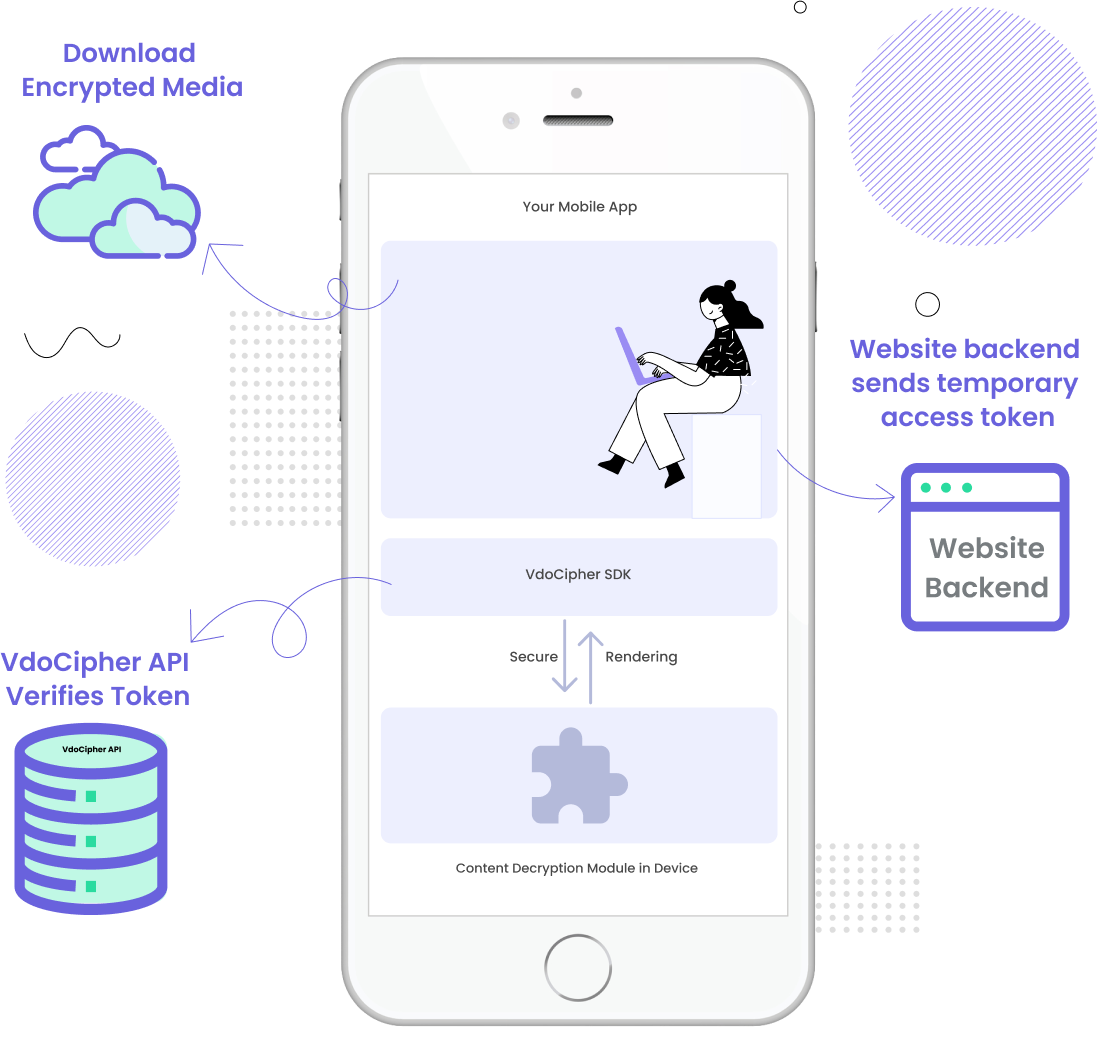
How To Use the FairPlay DRM Deployment Package
Once Apple approves commercial FairPlay deployment, you receive an FPS Deployment Package for production use. Apple defines this as the production package for deploying FairPlay Streaming, separate from the SDK used for development/testing. Apple’s current FairPlay page also notes newer SDK support for multiple certificate bundles and provisioning data, and says the SDK includes a precompiled cryptographic library and provisioning data file.
In older FairPlay guides and community material, the setup was often described in terms of generating an RSA key pair, getting a signed certificate, and handling a separately discussed ASK plus private-key passphrase. In newer SDK 26-style workflows, the deployment/package model is better understood in terms of:
- PEM/private key material
- Certificate / certificate bundle
- Provisioning Data
Apple publicly lists provisioning data and certificate bundle support in the current FairPlay materials.
Checklist before proceeding
- Make sure you understand the full FairPlay deployment flow before starting.
- Keep the received deployment credentials and related files backed up securely.
- Restrict access to only authorized technical personnel.
- Keep internal notes of what each file is used for in the KSM/license-server setup.
- If you are integrating through VdoCipher, coordinate with our team before moving credentials into production.
What Apple now provides for deployment
For current FairPlay deployment workflows, the practical credential set generally includes:
- PEM File – The server-side private key material used by the KSM/license server for FairPlay processing.
- Certificate / Certificate Bundle – The FairPlay certificate material associated with the deployment setup. Apple’s current materials explicitly mention support for multiple certificate bundles.
- Provisioning Data – The FairPlay provisioning data provided by Apple as part of the newer server-side setup. Apple publicly lists provisioning data as part of the current FairPlay SDK/deployment ecosystem.
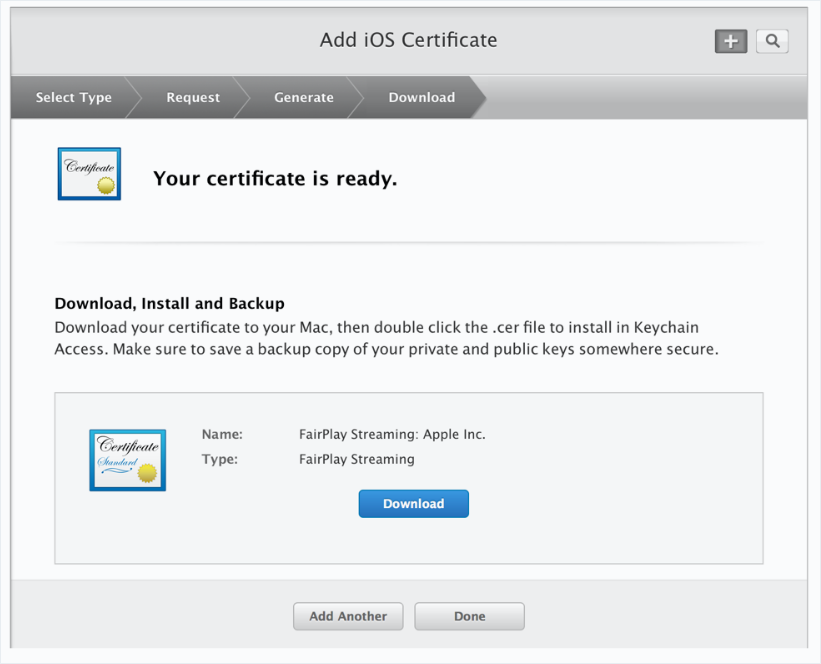
(Screenshot where FairPlay DRM signed certificate is downloaded)
How do we use the above credentials?
Apple FairPlay DRM is a multi-component system. On the content-provider side, the content key, IV, and content ID mapping are maintained in backend systems, while the KSM/license server handles the FairPlay playback transaction by processing SPC and generating CKC. Apple’s overview says the content provider manages the content key and IV database, and the KSM side uses this information during the key-delivery process.
So in simple terms:
- Certificate / certificate bundle helps support the FairPlay request/response chain.
- PEM/private key material is used on the server side by the KSM.
- Provisioning data is part of the FairPlay server-side deployment credential set in newer workflows.
- Content keys are maintained separately in the provider’s backend/key-mapping systems.
How do we store your FairPlay deployment credentials?
We use dedicated licensing infrastructure separated from the rest of the video delivery stack. The KSM/license server and key-related databases are access-controlled and isolated.
Our storage model is:
- Server-side private key / PEM material is stored in restricted internal storage and is accessible only to the FairPlay licensing path.
- Certificate / certificate bundle is stored separately and used where required by the FairPlay playback flow.
- Provisioning data is stored securely as part of the KSM-side deployment configuration.
- Content key / IV / content ID mapping is stored in protected backend systems used by the FairPlay licensing workflow.
Apple’s FairPlay overview confirms that the content provider manages the content key and IV database associated with the content.
We also maintain secured backups and operational controls around these systems.
Safe-keeping
Although we take extensive care with deployment credentials, you should also maintain your own secure backups and records. These credentials are critical for FairPlay production playback and should remain accessible only to authorized personnel.
As a checklist, the items to safely preserve are:
- PEM / private key file
- Certificate or certificate bundle
- Provisioning data
If your implementation or older internal notes still separately reference ASK, retain that information securely as well where applicable. However, for current integrations, the exact contents of the Apple-issued deployment package should be treated as the source of truth.
It is recommended not to rely on memory alone. Keep all files and credential-handling notes in a secure digital vault or restricted-access credential store.
Sending your Apple FairPlay deployment credentials to VdoCipher
To share the FairPlay deployment credentials with us, use info@vdocipher.com only. Do not send the files to any other email address or include unrelated recipients in CC. This helps keep the credentials within the intended secure handling flow.
Please send only the files/details explicitly requested by our integration team, typically from the deployment package such as:
- PEM/private key material
- Certificate / certificate bundle
- Provisioning data
After we confirm successful receipt and secure onboarding, remove the email from routine inbox access wherever possible and preserve your own secure backup separately.
FAQs on Apple FairPlay DRM Streaming
By now you must have got a fair enough idea on Apple FairPlay DRM iOS and Safari Video Security. It is a must-have for video protection on Apple devices. However, if you still have any doubts left about it and want to know more, then here we have mentioned some frequently asked questions. This will give you more understanding of Apple FairPlay DRM iOS:
Does Apple still use Fairplay?
Yes, Apple uses Fairplay DRM to secure its music content and Movie platforms also use Fairplay DRM to secure videos on Mac and IOS.
Does Fairplay DRM support Safari?
Yes Apple Fairplay DRM supports high secure playback in Mac Safari, IOS Safari and IOS App.
How can I get a Fairplay License from Apple?
Please contact support@vdocipher.com for a detailed guideline from VdoCipher on applying and integrating Apple Fairplay DRM.
Does Fairplay DRM prevent video downloads?
Yes, Fairplay DRM prevents illegal video downloads because of its strong encryption.
Does Fairplay DRM prevent screen capture?
Yes, Fairplay DRM also blocks screen capture in Safari & IOS App.
Is Fairplay DRM free?
Apple Fairplay DRM integration is technically handled by DRM companies like VdoCipher to ensure the highest security on IOS and Mac.
How to secure videos from piracy in IOS App?
The highest security in the IOS app is ensured with the integration of Fairplay DRM. VdoCipher provides integration for Fairplay DRM
How to secure videos from piracy in IOS?
The highest security in IOS is ensured with the integration of Fairplay DRM. VdoCipher provides integration for Fairplay DRM.
We’ve also written a blog on how to stream videos on iOS using AVPlayer, do check it out to know more about video streaming in iOS.
Video DRM security from Video Piracy for IOS, Android & Desktop
VdoCipher provides Apple Fairplay DRM integration and application guidelines for ios and Mac secure playback. VdoCipher also provides Google Widevine DRM for Android and Desktop. We are trusted by 2000+ customers from 40+ countries.