

People spend millions of hours on Facebook videos and even five times more hours on YouTube another social media platform. In the present computerized world, online training is blasting. Inside this market, a video hosting platform for online courses or media platform is a key division. Given this pattern, have you considered giving eLearning courses to wellness or health videos, therapeutic instruction, school courses, or something else? On the off chance that you’ve held off, right now is an ideal opportunity to join this industry.
The eLearning business sector is ready to develop to $325.10 billion by 2025. When making pre-recorded videos, picking an online video hosting stage to have them on is one of the most significant choices you’ll make. We’ve made an examination outline beneath to enable you to pick a video hosting platform for online courses in an efficient manner.
Table of Contents:
- What is Video Hosting, Really?
- The Hidden Complexity: What Happens After You Click “Upload”
- Video Hosting Platform for Online Courses
- Top 10 Video Hosting Platform
- Video Hosting For Website & App Business
- Video Hosting For Content Creators
- How does a Video Hosting Platform work?
- How using a free platform like youtube can hurt your business?
- Video Hosting Platforms FAQ Summary
What is Video Hosting for Online Courses?
Video hosting for online courses is a service that stores, encodes, protects, and delivers course videos to enrolled students.
Think of video hosting as a specialized digital warehouse built specifically for your video content. While your website host handles your text, layout, and images, a video host takes the heavy lifting of video delivery off your shoulders.
When you use a service like VdoCipher, you aren’t just “storing” a file. You are tapping into a massive infrastructure of servers and delivery networks designed to do one thing: get your video to your viewer’s screen as fast and securely as possible.
Unlike general platforms like YouTube, dedicated course video hosting platforms are built for education businesses. They usually offer features such as private video embedding, ad-free playback, learner analytics, LMS integrations, custom players, access controls, and, in some cases, DRM encryption to prevent unauthorized downloads.
For a free public lesson, YouTube may be enough.
But for a paid course, coaching program, LMS, academy, or EdTech platform, you need more control over who can watch your videos, where they can watch them, and how securely the content is delivered.
How it Works in the Real World
Instead of uploading the video to your own server, you upload it to the hosting platform. They give you a little piece of code (an embed code) that you paste onto your site. To your visitor, the video looks like it’s part of your page. But in reality, the video is playing from the host’s powerful servers, keeping your website light, fast, and responsive.
The Hidden Complexity: What Happens After You Click “Upload”
Most people think uploading a video is a one-and-done step. But a lot happens behind the scenes to make sure that video actually plays for a guy on a train in London or a student at a cafe in Mumbai.
1. Transcoding (The Multi-Size Trick)
When you upload a video, a professional host doesn’t just keep that one giant file. It creates several different versions of it—1080p, 720p, 480p, and even 240p.
Why? Because not everyone has a 5G connection. If your viewer is on a spotty mobile network, the player will automatically “hand off” the 480p version to keep the video moving. This is called Adaptive Bitrate Streaming, and it’s the difference between a happy viewer and someone who closes your tab in frustration.
2. The Power of CDNs
A Content Delivery Network (CDN) is a global web of servers. If your business is based in Delhi but you have a lead watching your video from New York, a good video host will serve the video from a server in New Jersey. By physically shortening the distance the data has to travel, you virtually eliminate lag.
A professional video hosting platform usually handles:
- Storage: Keeping your original video files safely hosted
- Transcoding: converting videos into multiple qualities like 1080p, 720p, 480p, and 240p
- Adaptive streaming: adjusting video quality based on the viewer’s internet speed
- CDN delivery: serving videos from servers closer to the viewer
- Player customization: embedding a branded video player on your website or LMS
- Security: restricting access, preventing unauthorized downloads, and protecting paid content
- Analytics: showing watch time, drop-offs, engagement, and viewer behavior
- Integrations: connecting video playback with LMS platforms, apps, websites, and APIs
For online courses, these features directly affect student experience, completion rates, piracy risk, and revenue.
A student watching from a slow connection in a tier-2 city should still get smooth playback. A paying learner should not be able to casually share the video URL with others. A course owner should be able to see whether students are actually completing lessons.
That is where dedicated online course video hosting becomes important.
Video Hosting Platform for Online Courses
Before we dwell on the top 10 video hosting platforms. Let’s have a look at what features you need to be looking for:
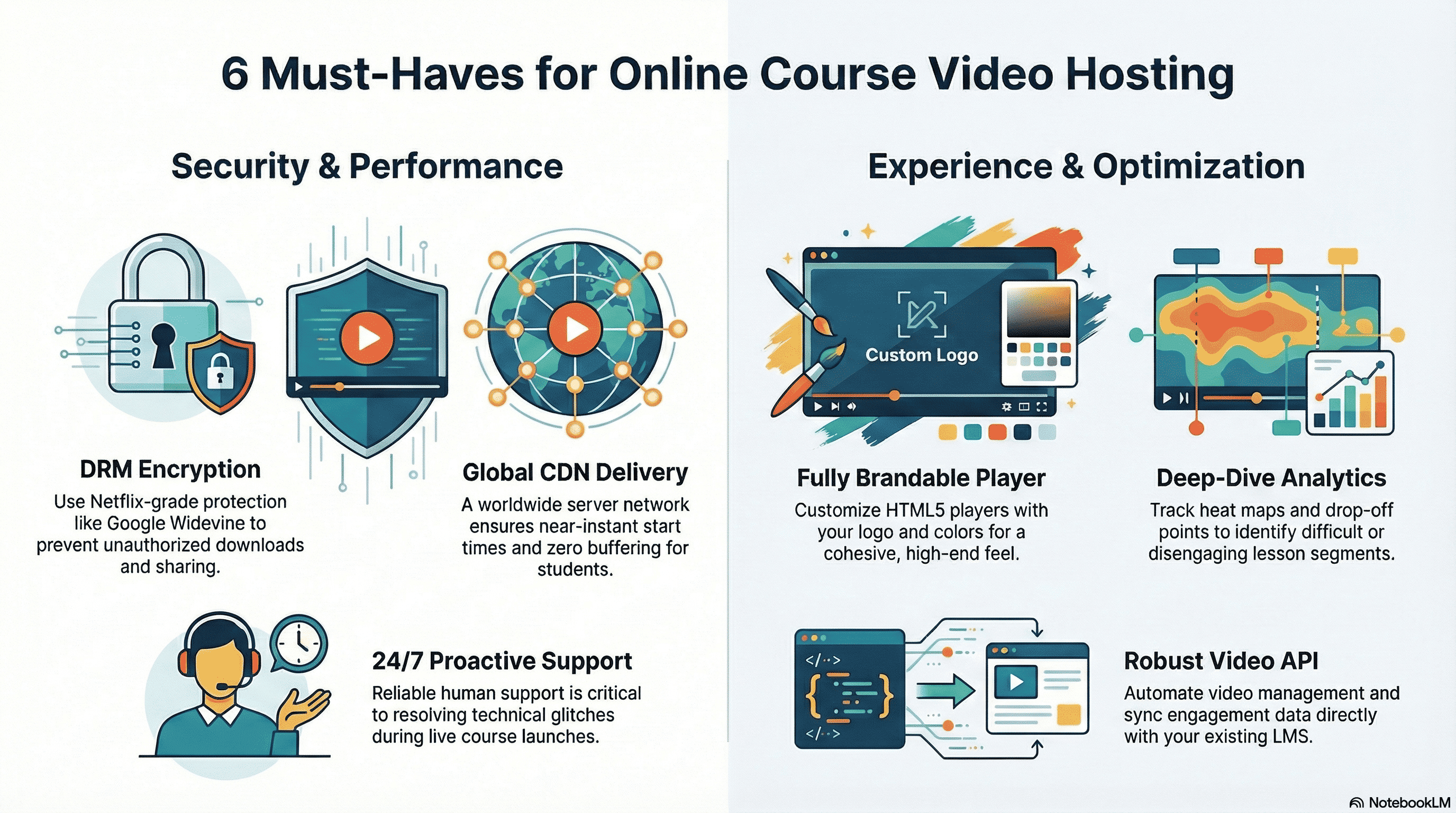
The “Must-Have” of Video Hosting Platform for Online Courses
1. Security That Actually Works
If you are selling a course, your video is your currency. You can’t afford to have someone download your hard work with a simple browser extension and share it for free.
The gold standard here is DRM (Digital Rights Management). You want a platform that supports Google Widevine DRM and Apple Fairplay DRM. This is the same level of encryption used by giants like Netflix. Without it, features like “password protection” are just a thin veil that any tech-savvy student can bypass.
2. A Player That Fits Your Brand
First impressions matter. When a student logs into your portal, they shouldn’t see a generic player with another company’s logo plastered all over it. Look for a customizable HTML5 player. You should be able to add your own logo, change the colors to match your brand, and control the playback speed. It makes your entire course feel more cohesive and high-end. This is why you need a good custom video player, which you can easily customise, preferably with easy to use toggle buttons.
3. Global Speed (The CDN Factor)
Your students might be in London, Dubai, or Singapore. To ensure they aren’t staring at a buffering wheel, your host needs a solid video CDN (Content Delivery Network). This is a web of servers across the globe. When a student hits play, the video is served from the server physically closest to them. It makes the “start” time near-instant.
4. Deep-Dive Analytics
Most video hosting platforms will tell you how many people clicked “play.” But for a teacher, that’s not enough. You need to know:
-
Heat maps: Where are students re-watching? (This usually means the concept is difficult).
-
Drop-off points: Where are they quitting? (This means the video might be too long or boring).
-
Engagement levels: Are they actually finishing the lessons? These metrics allow you to refine your teaching and plan your next batch of content more effectively.
5. Seamless Integration (Video API)
As your business grows, you’ll likely want your video platform to “talk” to your existing website or LMS (Learning Management System). A robust Video API allows you to automate things, like automatically uploading videos or pulling engagement data directly into your student dashboard, without having to do everything manually.
6. Proactive Support
In the world of online education, a technical glitch during a live launch can be a disaster. You don’t want to wait 48 hours for an email reply. Look for a partner with a proactive help desk and 24/7 support. When things go sideways, you need a human on the other end who understands that your business is on the line.
Detailed blog on top 10 features to look for in video hosting platforms
Quick Comparison: Best Video Hosting for Online Courses
| Platform | Best For | Security Level | LMS / Website Fit | Pricing Type |
|---|---|---|---|---|
| VdoCipher | Secure paid courses and EdTech platforms | Very High — DRM + watermarking | WordPress, Moodle, custom LMS, apps, APIs | Paid plans |
| YouTube | Free public course content | Low | Easy embed, not ideal for paid LMS | Free |
| Panopto | Universities, schools, lecture capture | High | Strong LMS focus | Custom / institutional |
| Kaltura | Enterprise learning and media workflows | High | Strong LMS and enterprise integrations | Custom / usage-based |
| Vimeo | Branded video playback for creators | Medium | Website embeds, creator sites | Free + paid plans |
| Wistia | Marketing-led course funnels | Medium | Website embeds, lead capture tools | Free + paid plans |
| Brightcove | Enterprise video operations | High | Enterprise CMS and video workflows | Custom |
| JW Player | Developer-led video streaming | Medium to High | API-first websites and apps | Custom / business plans |
| Kajabi | All-in-one course business | Medium | Native course platform | Paid plans |
| SproutVideo | Affordable private hosting | Medium | Website embeds and privacy controls | Paid plans |
How to Choose Video Hosting for Your Online Course
There is no single best video hosting platform for every course business.
A solo creator selling a ₹999 course has very different needs from a medical training academy, an enterprise learning team, or a coaching business with thousands of paid students.
Use this framework to choose the right platform.
1. If your course is free, prioritize reach
For free educational content, YouTube can work well. It gives you discoverability, search traffic, playlists, subtitles, and easy sharing.
But it is not built for paid course protection. YouTube branding, recommendations, ads, and limited access control can hurt the learning experience.
2. If your course is paid, prioritize security
Paid courses need stronger protection.
At minimum, look for private embedding, domain restrictions, signed URLs, login-based access, and watermarking. For premium courses, certification programs, coaching content, medical training, financial education, and high-value video libraries, DRM encryption becomes much more important.
DRM makes it significantly harder for users to download and redistribute your videos because the video file is encrypted and the decryption keys are controlled through a license system.
3. If you use an LMS, check compatibility first
If your course runs on WordPress, Moodle, LearnDash, Teachable, Thinkific, Kajabi, or a custom LMS, your video hosting platform should fit into that workflow.
Look for:
- Embed support
- WordPress plugin support
- API support
- SSO support
- LMS integration options
- Analytics export
- User-level tracking
- Mobile app playback support
4. If you teach at scale, check bandwidth and playback quality
Course platforms often underestimate bandwidth.
A 1-hour HD video watched by 1,000 students can consume a large amount of data. If students rewatch lessons, download resources, or attend from different countries, bandwidth needs increase quickly.
Look for adaptive bitrate streaming, optimized encoding, CDN delivery, and predictable pricing.
5. If you want to improve learning outcomes, check analytics
Basic view counts are not enough.
For online courses, useful analytics include:
- Total watch time
- Completion rate
- Drop-off points
- Rewatch behavior
- Device and browser data
- Student-level engagement
- Video-level performance
- Suspicious access patterns
These insights help you improve course lessons and detect misuse.
Top 10 Video Hosting for Courses
1. Vdocipher
Best for: Secure video hosting for paid online courses, EdTech platforms, coaching businesses, media platforms and premium content libraries.
VdoCipher provides a video hosting solution for online course businesses to help them stream content on their site/app in a most secure and smooth manner. The key features are the highest security from video piracy through Hollywood Grade DRM encryption & watermarking technologies, and smoothest streaming at slow connections due to optimized encoding at lower sizes. Together these video protection features ensure that you have the best video encryption and the security keys needed to decrypt it are not accessible at all. This helps portals to earn maximum revenues from their content and ensure the best user experience even in tier 2,3 cities.
VdoCipher is the winner of the best company in the video security (DRM) category by prestigious Streaming Media Global, Europe. Packaged offerings include multi CDN integration, Transcoding, API & Plugin integration, Custom Player, offline app playback & Per video analytics. VdoCipher already serves e-learning and media businesses from 40+ countries with its offerings and offers seamless integrations with online course platforms.
Key Features
- Hollywood-grade DRM encryption
- Dynamic watermarking
- Domain restrictions
- Secure video embedding
- Multi-CDN delivery
- Adaptive bitrate streaming
- Optimized encoding for smooth playback on slow connections
- WordPress plugin and API support
- Custom video player
- Offline playback support for apps
- Per-video analytics
- Secure playback across browsers and devices
Pros
- Strongest option for piracy prevention among course-focused hosting platforms
- Ideal for paid courses, coaching programs, test-prep platforms, and EdTech businesses
- DRM and watermarking help prevent casual downloading and credential misuse
- Works well for websites, apps, WordPress, Moodle, and custom LMS platforms
- Useful for businesses serving students across different regions and internet speeds
Cons
- Not meant for public discovery like YouTube
- May be more security-focused than what a hobby creator needs
- Requires setup inside your website, app, or LMS
Pricing
VdoCipher plans start from paid tiers based on storage, bandwidth, and usage requirements. Plans start from $99 and include Hollywood Grade DRM security from piracy. Free 30 Day trial is available.
Best Use Case
Choose VdoCipher if your course videos are paid, premium, or at risk of piracy. It is especially useful for EdTech platforms, coaching institutes, medical training providers, financial educators, certification programs, and any business where leaked videos can directly affect revenue.
Explore More ✅
Vdocipher ensures Secure Video Hosting for Online Courses
Vdocipher helps over 3000+ customers from over 120+ countries to host their videos securely, helping them to boost their video revenues.
2.Youtube
Youtube is also a video hosting platform with more than 2 billion active users. It gives you the choice to make playlists so you can make a playlist to build your substance’s utilization. it has an inbuilt subscription and warning framework. You have the choice to profit from your videos through promotions. Also, it’s the second biggest internet searcher. It is utilized by many online course makers to post free video content on their channels.
If you have a free online course that you’d like to offer, at that point YouTube ought to be your go-to video facilitating website – particularly on the off chance that you need your intended interest group to have the option to discover your course.
We’ve recently published a blog on the history of Youtube, do check it out to know more about how the platform rose to its current status.
Pros
- Free and easy to use
- Great for discoverability and organic reach
- Familiar interface for students
- Useful for free lessons, previews, and marketing content
Cons
- Not recommended for paid course videos
- Limited control over branding and recommendations
- No DRM protection for premium course content
- Unlisted links can be shared
- Competitor videos and distractions may appear around your content
Pricing
Free.
Best Use Case
Use YouTube for free educational content, course previews, webinars, tutorials, and audience building. Avoid using it as the main hosting platform for paid courses.

3. Panopto
The Panopto is a business video hosting platform for online courses from businesses and colleges across the world. They promote themselves as a one-stop search for overseeing, live streaming platform, recording, and sharing video content. Whenever organizations and colleges need a simple, dependable answer for overseeing, streaming, and video recordings, they go to Panopto. They’ve constructed a video platform that any representative, educator, and student can utilize paying little respect to their related knowledge.
Estimating includes a permit model dependent on the number of clients, beginning at 500 clients and expanding from that point.
Pros
- Strong fit for universities and institutional learning
- Built for lecture capture and classroom recording
- Good LMS integration capabilities
- Useful video search and knowledge management features
- Suitable for large education teams and internal training
Cons
- May be too complex for solo creators
- Pricing is usually better suited to institutions than small course sellers
- Less focused on direct course monetization
- Setup may require administrative support
Pricing
Usually custom or institution-based pricing.
Best Use Case
Choose Panopto if you are a university, school, enterprise learning department, or organization that needs lecture capture and structured internal video learning.
4.Kaltura
Make training progressively intuitive, connecting with, and open. Kaltura offers the broadest arrangement of video the executives and creation instruments available, firmly coordinated with each lm.
From flipped study halls (uses flipped learning approach) to live games communicate, Kaltura powers the most recent patterns in training. Staff and understudies can without much of a stretch make, transfer, alter, oversee, distribute, find and convey astounding video to any gadget, live, or on interest. Perceive how video can drive communication, assemble network, support imagination, expand your span, and even improve learning results.
Pros
- Strong enterprise and education focus
- Highly customizable
- Good for large-scale video operations
- Supports live, on-demand, events, and learning workflows
- Useful for organizations with technical teams
Cons
- Can be complex for small creators
- Pricing and setup may not be simple
- May require technical support or implementation help
- Not the easiest choice for beginners
Pricing
Usually custom or usage-based depending on product and use case.
Best Use Case
Choose Kaltura if you are an enterprise, university, or large EdTech business that needs a customizable video platform with advanced integrations.
5.Vimeo
With Vimeo, you’ll get the good looking interface for distributing your online video courses. While this video service platform surely has constraints as to its transferring space limit, its incredible examination frameworks, customization capacity, and strong network settle on it an alluring decision for online course makers.
For online courses, Vimeo can work for creators who need a better experience than YouTube but do not require advanced DRM-level protection.
Pros
- Clean and professional video player
- Better branding control than YouTube
- Easy website embedding
- Good option for creators and small businesses
- Useful privacy controls on paid plans
Cons
- Not as secure as DRM-based platforms
- Bandwidth and storage limits depend on plan
- Less suitable for high-piracy-risk paid courses
- Advanced features may require higher plans
Pricing
Vimeo offers free and paid plans. Pricing varies based on storage, seats, privacy, analytics, and advanced features.
Best Use Case
Choose Vimeo if you want a clean branded video player for your course website and your content is not highly piracy-sensitive.

6. Wistia
Wistia is a good video hosting platform solution for entrepreneurs. It offers amazing examination tools and gives you a chance to screen different video commitment measurements.
Custom marking is just accessible on premium records. It gives you the choice to secret phrase secure your recordings. it Worked in choices for adding a call to activities and gathering leads.it is free for the initial three recordings.it is free for the initial three recordings. Wistia charges dependent on the number of recordings. We did a full comparison of Youtube vs Vimeo vs Wistia, find out how Wistia compares to these big platforms.
Pros
- Strong video analytics
- Good for lead generation and marketing funnels
- Customizable branded player
- Useful for landing pages and course sales pages
- Easy website embedding
Cons
- Not built primarily for course security
- DRM protection is not the core value proposition
- Can become expensive as video usage grows
- Better for marketing videos than protected course libraries
Pricing
Wistia offers free and paid plans. Paid tiers vary by storage, users, analytics, and marketing features.
Best Use Case
Choose Wistia if your course business relies heavily on video marketing, landing pages, lead capture, and engagement analytics.
7. Brightcove
Brightcove is also a video hosting platform that is enthusiastic about online courses. It helps their clients center around utilizing video to move their business in important ways, regardless of whether that is in communicating or distributing, showcasing, or venture interchanges.
If you are searching for speed enhancement, and more power over your online course’s marking then Brightcove is the correct decision for you. The completely adjustable arrangement that supports modules.
It accompanies a 30-day free time for testing for testing the stage.
Pros
- Enterprise-grade video delivery
- Strong scalability
- Good for large organizations and media operations
- Supports advanced video workflows
- Useful for businesses with complex video requirements
Cons
- Not ideal for small course creators
- Pricing is usually enterprise-focused
- Setup can be more complex
- May be more than what most course businesses need
Pricing
Custom enterprise pricing.

8. JW Player
JW Player, a New York based company was developed in 2005 as an open source project. It was initially used in the first version of YouTube but now serves over a billion users monthly through the player. The player is named after the founder Jeroen Wijering and was initially distributed via Wijering’s blog. In 2015, JW Player was rewritten to reduce size and load time and it also changed its licensing from open source to Creative Commons for non-commercial use. It had integrated support for HTML5 Video which allows video to be watched on phones, tablets, and PCs. Its features include JavaScript API, multi-bitrate HD encoding, and also supports customization for enterprise levels. JW player now also provides video hosting services in combination with its player.
Pros
- Strong player technology
- Developer-friendly
- Good for custom websites and apps
- Supports adaptive streaming
- Useful for businesses that need player-level control
Cons
- Not built specifically for course creators
- Security depth depends on implementation and plan
- May require developer involvement
- Less beginner-friendly than all-in-one course platforms
Pricing
Pricing varies by business and usage requirements. Confirm current pricing directly before publishing.
9. AWS
Amazon Web Services (AWS), excels in offering a wide range of over 200 services, including video hosting, streaming, CDN, cloud computing, and storage solutions. Its global presence via an extensive network of data centers, ensures content availability and uptime. The only issue with AWS’s services is that of complex documentation which can be daunting for average users. Clients will often use various AWS services in combination with scaling features that allow them to use more computing in high application usage times, and then scale down to reduce costs when there is less traffic. AWS also allows reselling its services through improved means and marketing. Fees are based on a combination of usage also known as a “Pay-as-you-go” model for hardware, operating system, software, or networking features chosen by the client.
10. Google Cloud Platform
Google Cloud Platform (GCP), offered by Google, is a set of cloud computing services that provides a series of modular cloud services including video hosting, computing, data storage, data analytics, and machine learning. It runs on the same infrastructure that Google uses internally for its end-user products, such as Google Search, Gmail, and Google Docs. Registration requires a credit card or bank account details. It provides infrastructure as a service, platform as a service, and serverless computing environments.
Now that you are done with the article, check out our article on eLearning video software, to know about all the tools you’d require to create video courses.
11. Kajabi
Best for: Course creators who want an all-in-one course business platform.
Kajabi is not just a video hosting platform. It is an all-in-one platform for selling online courses, memberships, coaching programs, communities, email campaigns, landing pages, and digital products.
For creators who do not want to stitch together multiple tools, Kajabi can be convenient. You can build course pages, host content, manage payments, create funnels, and run email marketing from one place.
However, Kajabi is not primarily a dedicated secure video hosting platform. It is best for creators who value simplicity and business tools over deep video security.
Pros
- All-in-one course business platform
- Built-in course builder, landing pages, email, and payments
- Good for non-technical creators
- Reduces need for multiple tools
- Useful for coaching, memberships, and digital products
Cons
- Not focused on DRM-level video protection
- Less flexible if you already have a custom LMS
- Can be expensive for creators who only need video hosting
- Platform lock-in may be a concern
Pricing
Kajabi offers paid plans that vary by products, contacts, admin users, and business features.
Best Use Case
Choose Kajabi if you want an all-in-one course platform and do not want to manage separate tools for website, email, payments, and course delivery.
12. SproutVideo
Best for: Budget-friendly private video hosting for small businesses and creators.
SproutVideo is a business video hosting platform that offers private video hosting, customizable players, analytics, privacy controls, and live/on-demand video features.
For online courses, it can work for creators or small businesses that need more control than YouTube but do not need enterprise-level infrastructure or advanced DRM.
Pros
- More private than YouTube
- Good for small businesses and creators
- Custom player and embed options
- Useful analytics and privacy controls
- More affordable than many enterprise platforms
Cons
- Not as secure as DRM-first platforms
- May not be enough for high-value paid courses
- LMS integrations may be more limited than education-first platforms
- Advanced security may require higher plans
Pricing
SproutVideo offers paid plans, typically based on features, storage, privacy controls, and business needs.
Best Use Case
Choose SproutVideo if you need affordable private video hosting for a small course website and do not require DRM-level protection.
Here are the Top 10 Video Hosting Platform for online courses:
- VdoCipher
- Youtube
- Panopto
- Kaltura
- Vimeo
- Wistia
- Brightcove
- JW Player
- AWS
- GCP
Video Hosting For Website & App Business
Businesses rely heavily on video hosting services, their requirement ranges from showcasing their product to the audience, training their staff and even creating content for user consumption. For all such cases, they require premium features including security, analytics, and APIs which free hosting services don’t provide. Using a hosting site like YouTube can really hurt their business for several reasons such as leakage of content and user being distracted from ads and suggestion
Businesses use video hosting for three major purposes.
- Marketing: Videos are often used by businesses to market their products or services. A short video can really work wonders to get a message across to the user and further help them in their buying decision.
- Internal Training or Communication: Large enterprises often use training videos to welcome new employees, train both new and existing employees, or at times pass on crucial information. In addition, they also use employee tracking apps to keep things under proper control. There are some great tools specifically for onboarding training, but look out for newer more effective solutions to Trainual that integrate other documentation processes. Having a good enterprise video solution can be a great pick for your video needs.
- Content for Customer: These requirements can range from customer onboarding videos to eLearning content and movies online.
If the videos are being used for marketing purposes, ad-free and other video suggestions can be distracting for a user and can be counterproductive for the original goal. Similarly, videos for internal communication, contain information meant for your employees only and you’d rather not have it out in the open. Any public video hosting platform like youtube or Vimeo won’t solve your requirements. This is why businesses go for private video hosting, to make sure that the content is only being viewed by the right people. These video hosting platforms come bundled with various features and security which makes it even a more viable option.
Free vs Paid Video Hosting for Online Courses
Free video hosting sounds attractive when you are starting out. But the right choice depends on whether your course is free, paid, private, or premium.
Free Video Hosting
Free platforms like YouTube are useful when your goal is reach.
They work well for:
- Free tutorials
- Course previews
- Awareness content
- Public webinars
- Top-of-funnel education
- Personal branding
- SEO and discovery
But free hosting has limitations.
You usually get less control over branding, recommendations, ads, access, security, and student experience. For paid courses, these limitations can directly affect revenue.
Paid Video Hosting
Paid video hosting is better when your course content is part of your business model.
It works well for:
- Paid courses
- Certification programs
- Coaching programs
- Medical training
- Test preparation
- Corporate training
- Premium video libraries
- Subscription-based education platforms
Paid hosting gives you better control over privacy, playback, branding, analytics, integrations, and content protection.
When Should You Move From Free to Paid Hosting?
Move to paid course video hosting when:
- You sell access to your videos
- Students share links outside your platform
- Your course is being pirated
- You need better analytics
- You want an ad-free learning experience
- You need LMS or website integration
- Your videos need to play smoothly across regions
- You want branded playback instead of a YouTube player
- You need DRM, watermarking, or domain restrictions
Video Hosting For Content Creators
If you are a content creator online, chances are that you’re already on platforms like YouTube and Vimeo. In case you aren’t you’d want to be on these video sharing platforms.
These platforms make sense as they are free and have more suitable for your needs, especially when you want to build up an audience. YouTube is only the second largest search engine only after Google. You’d imagine the traffic and users they get. So the best bet for any content creator would be to tap into their user base. Content creators can monetize their content and earn money based on the ads on their videos.
In case you already have a wide audience and you’d rather have users visiting your site, then you can opt for private video hosting. Meanwhile do check out our blog on short video platform.
How does a Video Hosting Platform work?
Many online businesses spend a lot on these services and require features over and beyond video security. VdoCipher, with its video hosting solution, fulfils all major requirements which cover all businesses needs. VdoCipher follows the below 6-step Video Hosting, DRM based Video Encryption, and Streaming process that set us apart from the competition.
- Upload – Users upload their video content through various options like Desktop, FTP, DropBox, directly from the server, and directly from URL. It supports all typical video formats.
- Transcoding for Protected Streaming – After upload, video encryption is done via DRM encryption protocol & multiple bitrates. Video transcoding is done for optimization at multiple bitrates such that viewers on networks of any quality can conveniently stream videos.
- Storage of Encrypted Content – The video content is securely stored on Amazon’s AWS S3 servers using our own server-side video encryption technology, creating a double layer of protection ensuring complete security.
- DRM Encrypted Video Transfer – Once the encryption is done, the encrypted content then needs to be streamed to the final viewer interface. The encryption is performed using a non-public key whose exchange mechanism is hidden. The transfer of this encrypted content is done by generating a one time URL after which the content is transferred in chunks to optimize video streaming further.
- Licensing & Authentication – VdoCipher provides One Time generated dynamic video URLs which are accessed only through custom video embed codes, allowing licensing duration for each single video stream. This prevents any URL based sharing.
- Decryption & Playback – At last, the encrypted stream content is decrypted inside the player with a dynamic key. Our DRM based key transfer protocol fundamentally differs from the public key transfer protocol. A private key transfer between the website and our API makes it impossible for the hackers to decrypt our streams, hence making our video encryption hack-proof.
Here’s the complete explanation of how VdoCipher’s Online Video Hosting Platform works.
Secure Video Hosting for Online Courses: What Protection Do You Actually Need?
Not every online course needs the same level of security.
A free YouTube tutorial does not need DRM. A ₹50,000 certification program probably does.
Here is a simple security ladder.
Level 1: Public Hosting
This includes platforms like YouTube, where videos are either public or unlisted.
Best for free content. Not ideal for paid courses.
Level 2: Private Embeds
This allows you to embed videos on your own website and restrict where they appear.
Good for basic course websites, but not enough for high-value content.
Level 3: Passwords and Signed URLs
This adds controlled access and makes it harder to casually share links.
Useful for small paid courses, but still not full protection.
Level 4: Dynamic Watermarking
Dynamic watermarking places viewer-specific information like name, email, phone number, or user ID on the video.
This discourages screen recording because leaked videos can be traced back to the viewer.
Level 5: DRM Encryption
DRM is the strongest layer for paid course protection.
With DRM, the video is encrypted and can only be decrypted by an authorized playback environment. This prevents simple downloading and makes piracy much harder.
For premium course businesses, DRM plus dynamic watermarking is the strongest practical combination.
How can using a free platform like YouTube hurt your business?
When it comes to consuming online video content, youtube is almost everybody’s first choice. In fact, a lot of content creators or YouTubers are generating significant revenue from it. And is also used by various businesses too for hosting their videos. However, if you want to monetize your video content, youtube might not be the right choice for you due to the following reasons:
Weak Video Security
Videos hosted on YouTube aren’t very secure and can be downloaded easily by using any plugin or an online tool.
Non-removable Youtube Branding
The HTML5 video player used by youtube for streaming videos isn’t exactly customizable. You might have to compromise your branding part with it.
Unwanted Ads and Suggestions
Youtube shows a lot of ads of various types which can sometimes be really distracting as a user. Especially when you’ve paid or subscribed for premium content. Youtube shows different suggestions at the end of a video and users often tend to click them. This takes away a user streaming your content to some other content place.
LMS Compatibility: Which Video Hosting Platforms Work With Course Platforms?
A video hosting platform should not force you to rebuild your entire course business.
It should fit into the tools you already use.
| Platform | WordPress / LearnDash | Moodle | Teachable / Thinkific | Custom LMS / App | Best Fit |
|---|---|---|---|---|---|
| VdoCipher | Strong | Strong | Embed-based | Strong API support | Secure course websites and apps |
| YouTube | Basic embed | Basic embed | Basic embed | Basic embed | Free public videos |
| Panopto | Good | Strong | Limited / varies | Enterprise integrations | Universities |
| Kaltura | Good | Strong | Limited / varies | Strong APIs | Enterprise learning |
| Vimeo | Good | Basic embed | Basic embed | API support | Branded course websites |
| Wistia | Good | Basic embed | Basic embed | API support | Marketing-led course funnels |
| Brightcove | Good | Enterprise | Enterprise | Strong APIs | Large enterprises |
| JW Player | Developer-dependent | Developer-dependent | Embed-based | Strong APIs | Custom platforms |
| Kajabi | Native platform | Not applicable | Not applicable | Limited outside Kajabi | All-in-one creators |
| SproutVideo | Good | Basic embed | Basic embed | API support | Small businesses |
Video Hosting Platforms FAQ
What is the best video hosting site?
Top 10 video hosting sites including free and paid services are – Youtube, Vimeo, Wistia, VdoCipher, Dailymotion, Brightvideo, Kaltura. While Youtube and Vimeo are good for general video hosting, other services provide more detailed and custom solutions for education, media, and marketing needs.
Where can I host my videos for free?
Youtube and Dailymotion are the popular free video hosting sites. Other companies like Vimeo, VdoCipher, Wistia also offer free video hosting but limited to a certain amount and period.
Where can I host videos besides YouTube?
Besides Youtube, you can host videos on Vimeo, Wistia, VdoCipher, Dailymotion, Brightvideo, Kaltura. While Youtube and Vimeo are good for general video hosting, other services provide a more detailed and custom solutions for education, media and marketing needs.
Where can I host videos securely which can not be downloaded ?
VdoCipher provides DRM encryption and dynamic watermarking to prevention video download piracy. Vdocipher also hosts the content and provides a player for secure encrypted playback.
What is the most popular video sharing platform?
YouTube is the most popular video-sharing platform followed by likes of Tiktok, Whatsapp, Dailymotion. While youtube acts as a single platform that operates on web and app, Tiktok is an app-only video sharing platform.
What is the largest video sharing website?
Youtube is the most popular video-sharing platform followed by likes of Tiktok, Whatsapp, Dailymotion. While youtube acts as a single platform that operates on web and app, Tiktok is an app-only video sharing platform.
What video hosting servers should I use to serve videos ?
Popular top tier Servers to host and stream content include Amazon AWS, Google Cloud, Microsoft Azure, Akamai. You can also instead use video hosting platforms like Vimeo and VdoCipher which manage the hosting internally themselves using top tier servers.
What are good video hosting platforms for online courses?
Top video hosting platforms for online courses are – VdoCipher, Vimeo, Panopto, Kaltura, Wistia, Youtube and Brightcove. Each has a separate key advantage like video security from piracy, detailed analytics, custom enterprise solutions etc.
Video Hosting for Courses with Piracy Protection
At VdoCipher we maintain the strongest content protection for videos. We also deliver the best viewer experience with brand friendly customisations. We'd love to hear from you, and help boost your video streaming business.


 Shivas says
April 25, 2024 at 11:11 amI have read your blog on video hosting platforms, and I must say, superb examination on video hosting! It shows your expertise in writing, where you definitely struck the mark with the emphasis on the user experience, and your detailed instructions made the procedure quite obvious and easy. I thank the author for demystifying this challenging journey. Thank you for sharing such awesome insights.