

What is RTSP
RTSP (Real-Time Streaming Protocol) is not a transfer protocol, it is a control protocol and mainly allows you to send commands like play, pause, stop. It runs over TCP and is used to control your video/audio stream.
The transfer part is handled by RTP( Real-Time Transport Protocol) and RTCP (RTP Control Protocol) also works along to define and report stats like packet loss during transfer, jitters, A/V sync, etc.
The three protocols working summary,
| Protocol | Job |
|---|---|
| RTSP | controls the session like a remote control |
| RTP | carries audio/video packets like a bus carrying passengers |
| RTCP | Reports stats |
RTSP was developed by some experts from RealNetworks, Netscape, and Columbia University in around 1996, as a protocol it defines how the data in the stream should be packaged for delivery.
Know more:
How RTSP Session Works?
First of all you need to understand the RTSP is “mainly” to request via commands, you can also push a stream via ANNOUNCE and RECORD. For example, via RTSP you can request for a feed from a camera (which acts as a server). This is why many (because of open standard, lightweight, low latency) IP and CCTV cameras expose an rtsp:// URL.
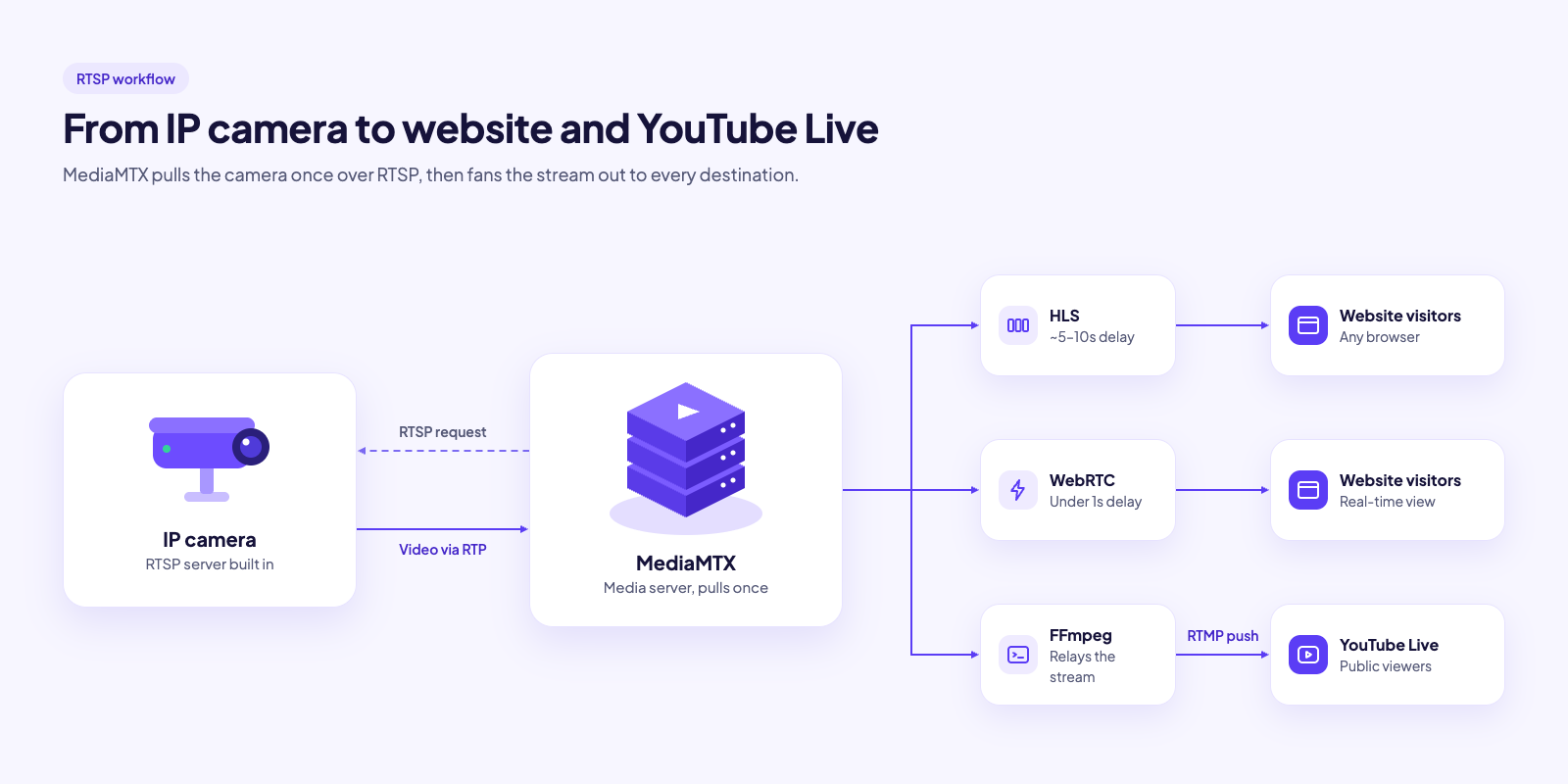
Let’s look at the figure of an example of IP Camera, we will take RTSP pull from it via a media server like MediaMTX convert it to HLS / WebRTC and send to website visitors and also we can RTMP push it via FFMPEG media server to directly on YouTube Live.
RTSP Methods or Commands
RTSP has the following small set of methods or commands. Most are used for pulling a stream, and 2 for pushing.
| Method | Sent by | Purpose |
|---|---|---|
| OPTIONS | Client | List supported methods |
| DESCRIBE | Client | Get SDP: tracks, codecs, control URLs |
| SETUP | Client | To set transport of a track like how to deliver one track (RTP over UDP or TCP and which ports) to return Session ID. |
| PLAY | Client | To start media stream |
| PAUSE | Client | To stop stream but keep session, recorded media only, live cams often ignore |
| GET_PARAMETER | Client | Read server value. Empty body = keepalive |
| SET_PARAMETER | Client | To set a value on the server |
| TEARDOWN | Client | To end the session |
| ANNOUNCE | Client | Push: send SDP of outgoing stream |
| RECORD | Client | Push: start sending media |
| REDIRECT | Server | Point client to another server. Rarely used |
What is RTMP
RTMP (Real-Time Messaging Protocol) is both a control protocol and also a transfer protocol. It also runs over TCP (usually on port 1935) and is used to both control and transfer your video/audio stream without depending on another protocol like RTP for transfer in case of RTSP.
It was built by Macromedia (named later Adobe) to enable streaming between Flash Player and Flash Media Server. Flash retired at the end of 2020, but RTMP kept on going for livestreaming as the standard way.
An RTMP URL has 3 parts:
rtmp://a.rtmp.youtube.com/live2/xxxx-xxxx-xxxx-xxxx- Server – a.rtmp.youtube.com
- App – live2
- Stream-key – xxxx-xxxx-xxxx-xxxx
RTMPS is also there which is RTMP wrapped in TLS encryption, usually on port 443.
Know more:
How does the RTMP Session Work?
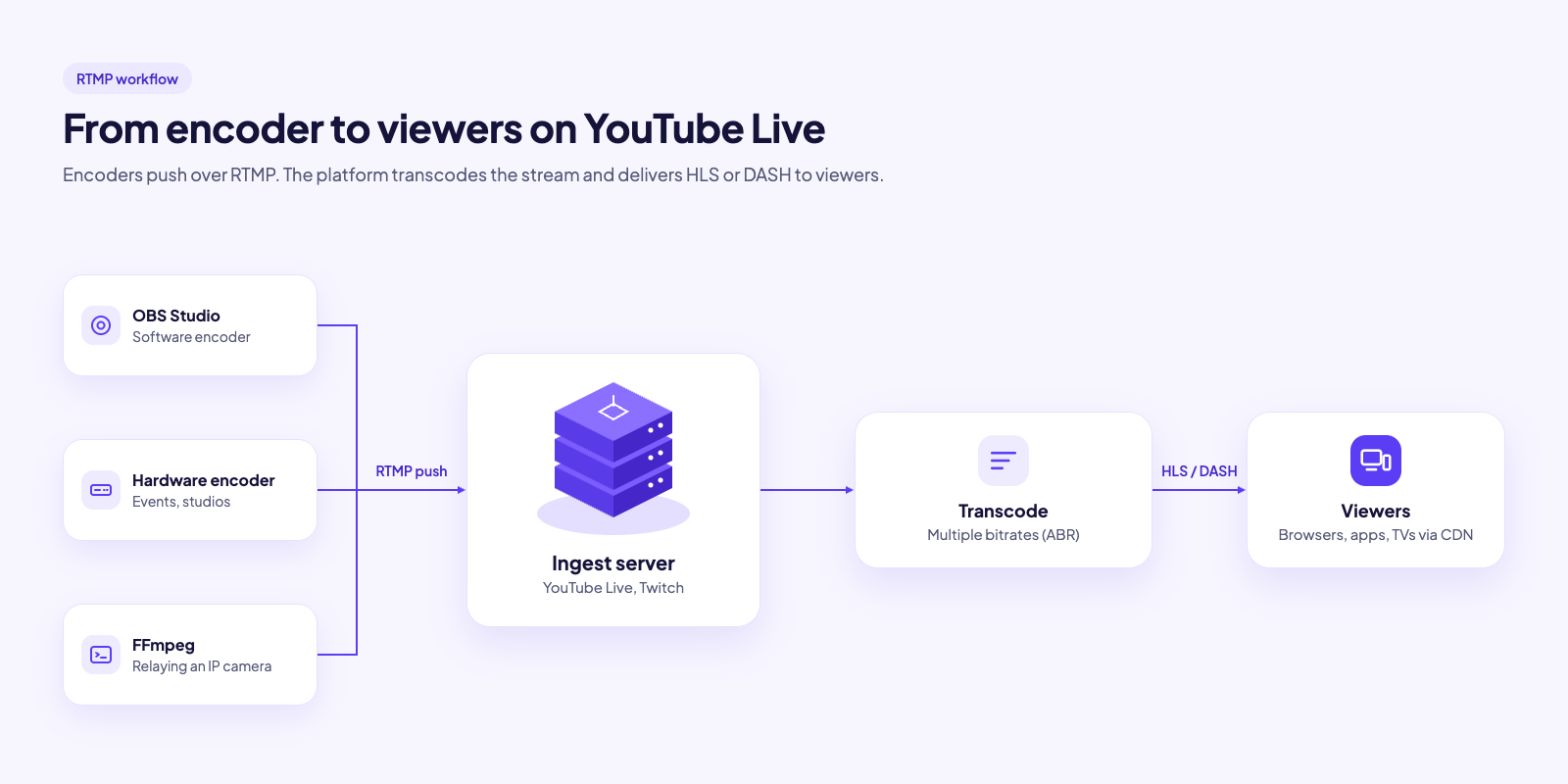
Unlike RTSP, RTMP is “mainly” used to push a stream or publish. Encoder like OBS, FFmpeg, a hardware encoder, or Zoom is the client which pushes to a server like YouTube Live, Twitch, Facebook, etc.
It can also pull a stream as it used to happen with Flash players, but since Flash players are not there, viewers usually don’t watch RTMP directly. The server converts it to HLS, DASH, or WebRTC segments for them.
Whenever you need to push a stream, live platforms like youtube give you an RTMP URL and a stream key where you can push your stream via FFmpeg, etc encoders.
RTMP Methods or Commands
| Command | Sent by | Purpose |
|---|---|---|
| connect | Client | to join an app. sends app name, tcUrl |
| _result / _error | Server | reply to a command: success or failure |
| releaseStream | Client | push: clear old stream with same key. Flash-era legacy, non-standard |
| FCPublish | Client | push: announce stream key. Flash-era legacy, non-standard |
| createStream | Client | open a stream channel. Returns stream ID |
| publish | Client | push: start sending media under stream key |
| @setDataFrame (onMetaData) | Client | push: send stream metadata like resolution, fps, codecs |
| play | Client | pull: request a stream |
| pause | Client | pull: pause/resume. VOD only |
| seek | Client | pull: jump to a timestamp. VOD only |
| onStatus | Server | status events like Publish.Start & Play.Start |
| FCUnpublish | Client | push: stop announcing stream key. Legacy |
| deleteStream | Client | close the stream channel |
RTMP vs RTSP: Specification Comparison
| Feature | RTMP | RTSP |
|---|---|---|
| Role | Control + media on one connection | Control only. Media via RTP/RTCP |
| Typical direction | Push (encoder to server) | Pull (client from camera) |
| Transport | TCP | Control: TCP. Media: UDP, or TCP interleaved |
| Default port | 1935 (RTMPS: 443) | 554 (RTSPS: 322) |
| Latency (typical) | ~1–3s ingest | ~0.5–2s |
| On packet loss | Retransmits, delay builds up | UDP: drops, visual glitches. TCP: same as RTMP |
| Video codecs | H.264. Enhanced RTMP adds H.265, AV1, VP9 | H.264, H.265, MJPEG. Any codec with an RTP payload format |
| Audio codecs | AAC, MP3. Enhanced RTMP adds Opus | AAC, G.711, G.726, Opus |
| Data/metadata | Yes (onMetaData, cue points) | Yes (e.g. ONVIF metadata tracks) |
| Encryption | RTMPS (TLS) | RTSPS (TLS), SRTP. Rarely enabled on cameras |
| Auth | Stream key in URL | Basic/Digest (user:pass) |
| Browser playback | None | None |
| Path to browser | Media server, then HLS/DASH/WebRTC | Same |
| Firewall/NAT | Easy: one outbound TCP connection | Hard with UDP. Pulling through NAT needs port forwarding |
| CDN | Accepted for ingest | Not supported |
| Scaling to viewers | Via media server/CDN | Via media server |
| Native support | OBS, hardware encoders, Zoom, YouTube, Twitch, Facebook | IP cameras, NVRs, VLC, FFmpeg |
| Spec | Adobe (2012), Enhanced RTMP (2023) | IETF RFC 2326 (1998), RFC 7826 / RTSP 2.0 (2016) |
RTMP vs RTSP: Use Cases Comparison
| Use case | Protocol | Why |
|---|---|---|
| IP cameras, CCTV | RTSP | Camera is a built-in RTSP server |
| NVR / VMS recording | RTSP | Pulls feeds from multiple cameras |
| AI video analytics | RTSP | Frigate, DeepStream, OpenCV read RTSP directly |
| Camera to website | RTSP, then HLS/WebRTC | Media server pulls and converts |
| OBS / software encoders | RTMP | Default output |
| YouTube, Twitch, Facebook ingest | RTMP / RTMPS | Standard ingest |
| Camera to YouTube Live | RTSP in, RTMP out | Media server bridges the two |
| Zoom / webinar restream | RTMP | Built-in RTMP output |
| Drones | RTMP or RTSP | Vendor dependent. DJI apps use RTMP |
| Older hardware encoders | RTMP | Often RTMP only |
| Mobile broadcasting apps | RTMP (or SRT) | Larix, PRISM, etc. |
| Unstable / long-distance networks | Neither: use SRT | Built for packet loss |
| Viewers in a browser | Neither: use HLS/WebRTC | Browsers support neither protocol |
RTMP and RTSP Pros/Cons Comparison
| RTSP Pros | RTSP Cons | RTMP Pros | RTMP Cons |
|---|---|---|---|
| Native on IP cameras | No browser playback | Universal platform ingest | No browser playback |
| Pull model, many clients | NAT/firewall pain | Universal encoder support | Bad on lossy networks |
| Low latency | Weak security in practice | Simple URL + stream key | Classic codecs only |
| Open IETF standard | Packet loss over UDP | Firewall friendly | No adaptive bitrate |
| UDP or TCP transport | Camera connection limits | Reliable TCP delivery | Stream key = password |
| Codec flexible | Vendor quirks | Low ingest latency | Plain RTMP unencrypted |
| Pause/seek control | No platform ingest | Audio, video, metadata on one connection | Frozen legacy spec |
| Metadata tracks | Doesn’t scale to viewers | RTMPS / Enhanced RTMP | Rare on cameras |
References
- RTMP Wikipedia – link
- RTSP Wikipedia – link
- MediaMTX on GitHub – link
- Reddit r/ffmpeg: Why streaming platforms use RTMP and not RTSP – link
- Stack Overflow: What is the difference between RTMP and RTSP? – link
Supercharge Your Business with Videos
At VdoCipher we maintain the strongest content protection for videos. We also deliver the best viewer experience with brand friendly customisations. We'd love to hear from you, and help boost your video streaming business.


My expertise focuses on DRM encryption, CDN technologies, and streamlining marketing campaigns to drive engagement and growth. At VdoCipher, I’ve significantly enhanced digital experiences and contributed to in-depth technical discussions in the eLearning, Media, and Security sectors, showcasing a commitment to innovation and excellence in the digital landscape.